Turn order
The steps of a round, top to bottom: what happens in each, for example buying or battles, and whose step it is. Add, move or remove steps; choose one to change it.
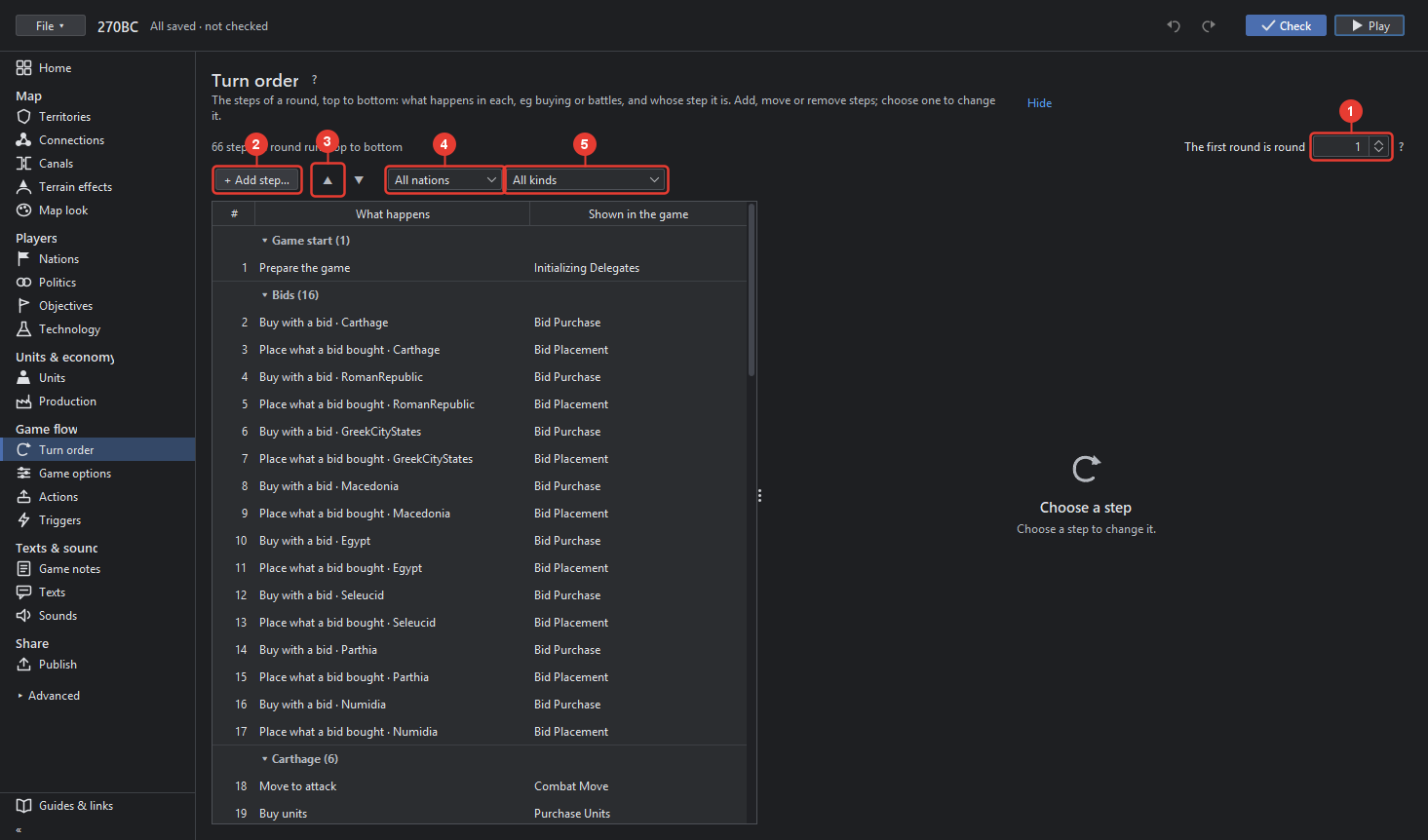
- The first round is round: the number the game counts from, 1 unless the map starts later in a war. The "?" explains it.
- + Add step… adds a step after the chosen one: pick what happens in it and whose it is.
- ▲ ▼ move the chosen step up or down; with a band chosen, a nation's whole run of steps moves.
- The first box shows one nation's steps; the second the steps where one thing happens, for example every battle step.
- The table: each row a step with its nation, what happens in it, how often it runs and its name in the game. The steps of one nation form a band.
A step, once chosen, shows on the right:
- Nation whose step it is, or none for a step of the whole round, for example the round's end.
- What happens: the kind of step, in plain words, from TripleA's delegates: buying, tech, combat move, battles, non-combat move, placing, end of turn, and so on. The kind also sets the ending of the step's name, by which TripleA tells combat from non-combat move.
- Runs: Every round or Only in the first so many rounds, for example a bid step.
- Name in game: the step's name in the game file, made from the nation and the kind unless you type one.
- Remove step takes it out. Check (F6) says when a nation lacks a step it needs.